Check to make sure your OneDrive is synced and connected. This can be known if the icon is a blue cloud.
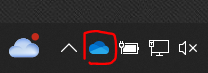
If the blue cloud does not show in the taskbar, click on the up arrow to open a tray with more icons visible.
When not within Wi-Fi or network range, OneDrive will pause syncing. It will also pause sync on a metered network such as hotspot. A pause icon will be next to the blue cloud if syncing was paused.
Was this article helpful?
That’s Great!
Thank you for your feedback
Sorry! We couldn't be helpful
Thank you for your feedback
Feedback sent
We appreciate your effort and will try to fix the article